
Images tell stories, capture moments, and help us make sense of the world. But how do computers make sense of images? Unlike us, they don’t “see” things the way we do, they break images down into numbers and patterns. One of the most important steps in image processing is edge detection, which helps identify the structure of objects in a scene.
I’ve always been fascinated by cameras, telescopes, and anything that captures images. That curiosity led me to explore Computer Vision, and edge detection felt like the perfect place to start.
In this post, I’ll be exploring the Canny Edge Detection algorithm, a powerful technique for detecting edges in images.
Representation of an Image
In computer vision, an image is nothing but a grid(matrix) of pixel values. Each pixel(short form for picture element) is a tiny dot that contains the light intensity information, but in color images, it’s more nuanced than just a single intensity value.
Grayscale Image
In a gray scale image, a pixel value directly corresponds to its brightness or intensity. A value of 0(zero) represents black (no intensity), and a higher value (like 255 in an 8-bit system) represents white (maximum intensity). Every thing in between are different shared of gray
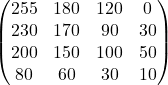
We often tend to think that gray scale images are so olden day way of taking pictures. However, gray scale images has tremendous uses in computer vision because they reduce computational complexity while retaining essential features. They simplify the operations like edge detection and filtering, which otherwise are computationally intensive.
Color Image
In color images, pixels are typically use RGB(Red, Green, Blue) color channels. A color pixel therefore is represented by a 3-element vector, where each element corresponds to the intensity of one of the primary color channels: red, green, and blue (RGB). By varying the intensity of red, green, and blue, a vast range of colors can be created. So, in a color pixel, intensity refers to the intensity of each of red, green and blue components.
In color images, various color arises from the combination of the intensities of the red, green, and blue color channels within each pixel.
Pixel (R, G, B) = (255, 0, 0)  -> Red
Pixel (R, G, B) = (0, 255, 0)  -> Green
Pixel (R, G, B) = (0, 0, 255)  -> Blue
2D Images
A 2D images represents a flat, two dimensional surface. It captures information about width and height of an object or scene. Each pixel in a 2D image has a location defined by its (x, y) coordinates. 2D images don’t show depth information. They show what a scene looks like from a single viewpoint and only depicts surfaces, but not the volumetric structures of objects.
3D Images
A 3D image represents a three-dimensional volume. It captures information about the width, height, and depth of an object or scene. Each voxel (the 3D equivalent of a pixel) in a 3D image has a location defined by its (x, y, z) coordinates. The key idea is that it provides information on volumetric understanding of objects and scenes. 2D images are a projection of a 3D world onto a 2D plane. 3D images retain the 3D information.
Image Processing
Image processing is the manipulation and analysis of digital images using algorithms. It involves transforming an input image into a desired output image or extracting useful information from it. While there are many elements in image processing the fundamental concept is edge detection, which kind of paves the way for feature extraction and object identification.
Edge Detection
Edges are the points in an image where brightness changes sharply. Edge detection is essential for identifying object boundaries, feature extraction and also image segmentation.
The Canny Edge Detection Algorithm is one of the most widely used methods for detecting edges in images. It is a is a multi-stage algorithm and it uses two levels of thresholds. Lower values detect more edges (but may include noise), while higher values detect only strong edges.
Numerical Breakdown of the Canny Algorithm
Gradient Calculation – Finding Intensity Changes
Gradient in the context of edge detection is nothing but the change in intensity of adjacent pixels in a given direction. In more formal way, gradient essentially represents the rate of change of pixel intensity.
- Canny algorithm uses Sobel operator for calculating gradients. The Sobel operator is a discrete differentiation1 operator, which approximates the gradient of an image intensity function.
Example – Imagine 1-D row of pixels
[ 10 20 30 90 100 ]Intensity Value : Each value represents the brightness of a pixel (0 – BLACK through 255- WHITE)
Edge : Notice a jump from 30 to 90, this sudden change in intensity is where we expect an edge.
Gradient between 30 and 90 is 60 (large change), when compared to other pixel intensity difference.
2-D Example with a Focus on one Pixel
[ 50  50  50 ]
[ 50  100 150 ]
[ 50 150 200 ]- Horizontal Change – For pixel 100 (middle), the one to its right is much brighter so the gradient change is roughly 50
- Vertical Change – The pixel below (150) is also much brighter than the center pixel (100). The vertical change is roughly 150 – 100 = 50.
- Gradient magnitude is the the magnitude of of gradient vector is calculated by Euclidean norm2
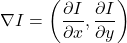
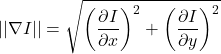

This large gradient magnitude tells us there’s a strong edge at the center pixel.
Non-Maximum Suppression (NMS)
The next step after finding gradients and magnitude of gradients is limiting the edges to a single pixel or thinning .We often get “thick” edges after finding gradients. This means that multiple adjacent pixels along an edge have high gradient values. It’s not visually clean, we want sharp, thin lines that represent edges.
The solution to this problem of think edges is by applying NMS technique. This strategy thins the thick edges by keeping only the pixel with maximum gradient magnitude along the gradient direction. It can be thought of as “sharpening” the edge by eliminating the weaker pixels around the strongest one.
- Local Maximum Check – For each pixel, it compares its gradient magnitude with its neighbors in the gradient direction
- Suppression: If the pixel’s gradient magnitude is not the local maximum, it’s suppressed (set to 0)
Pixel:             1      2    3    4    5    6     7

Magnitude:  10   20  30   25  15  40  35

Direction: --> --> --> --> --> --> --> (Horizontal)| Pixel 1 (Magnitude 10): It has no left neighbor. It’s compared with its right neighbor (20). 10 < 20, so it’s not a local maximum. Result: 0 | Pixel 4 (Magnitude 25): Compared with left (30) and right (15). 25 < 30, so it is not a local maximum. Result: 0 | Pixel 5 (Magnitude 15): Compared with left (25) and right (40). 15 is >25 but also 15 < 40, so it is not a local maximum. Result: 0 |
| Pixel 2 (Magnitude 20): Compared with left (10) and right (30). 20 > 10, but also 20 < 30, so it’s not a local maximum. Result: 0 | Pixel 6 (Magnitude 40): Compared with left (15) and right (35). 40 > 15 and 40 > 35, so it is a local maximum. Result: 40 (kept) | Pixel 7 (Magnitude 35): Compared with left (40). 35 < 40, so it is not a local maximum. Result: 0 |
| Pixel 3 (Magnitude 30): Compared with left (20) and right (25). 30 > 20 and 30 > 25, so it’s a local maximum. Result: 30 (kept) |
Pixel:            1    2     3       4    5     6     7
Magnitude:  0   0    30     0    0     40   0

Here after NMS technique, the edges have been thinned to single pixels.
Having thin and well-defined edges is crucial for tasks like object detection, shape analysis and measurements.
Hysteresis Thresholding
The goal of hysteresis thresholding is to eliminate weak edges and keep strong edges, while also connecting weak edges that are connected to strong ones. Hysteresis uses two thresholds: a high threshold and a low threshold:
- Strong edges: Pixels above the high threshold are definitely edges.
- Weak edges: Pixels below the low threshold are definitely not edges.
- Connected weak edges: Pixels between the two thresholds are considered edges only if they are connected to strong edges. This helps to fill in gaps in the edges and connect fragmented edges.
| Pixel 1 (Magnitude 0): 0 < 20, so it’s discarded. Result: 0 | Pixel 4 (Magnitude 0): 0 < 20, so it’s discarded. Result: 0 | Pixel 7 (Magnitude 0): 0 < 20, so it’s discarded. Result: 0 |
| Pixel 2 (Magnitude 0): 0 < 20, so it’s discarded. Result: 0 | Pixel 5 (Magnitude 0): 0 < 20, so it’s discarded. Result: 0 | |
| Pixel 3 (Magnitude 30): 20 < 30 < 35, so it’s a weak edge. It’s kept because it’s adjacent to pixel 6, (considered as a 2-D image)3 a strong edge. Result: 30 (kept) | Pixel 6 (Magnitude 40): 40 > 35, so it’s a strong edge. Result: 40 (kept) |
Pixel:            1    2    3    4    5    6    7
Magnitude: 0    0    30  0    0  40   0
From the below images, it is clear that, the thresholds play vital role in the noise reduction. When lower threshold is of 20 units, it did capture lot of noise and so is the case with TL -130, where it kind of missed few prominent edges. The trade off between what is considered noise vs useful detail(meaningful edge) helps to choose lower threshold and higher threshold in hysteresis thresholding.

NMS and hysteresis are two steps that are essential for producing high-quality edge maps that are useful for a wide range of computer vision applications. They transform the raw gradient data into clean, informative edge representations.
Final Thoughts
Edge detection is a crucial step in image processing, helping computers recognize shapes and structures within an image. The Canny algorithm stands out for its precision and effectiveness, making it a go-to choice for many applications.
OpenCV abstracts away many of these intricate details behind convenient functions. While this is undoubtedly useful, I believe that understanding the underlying concepts is just as important, it allows for better control over parameters and more informed decision-making. Exploring different parameter settings and experimenting with real-world images is the best way to get a feel for it.
Hope you found this insightful! This is just a small piece of the puzzle, there’s a lot more to explore in Computer Vision.
Code Reference
Actually there isn’t much code involved, the real essence is in the underlying concepts. OpenCV made it all simple and too much developer friendly, I would say!
Check out the code on my Github – Image – Edge Detection
References
“Computer Vision: Algorithms and Applications” by Richard Szeliski
- Discrete Differentiation – Unlike continuous differentiation which deals with functions that change smoothly and continuously, this deals with functions that are defined at discrete points. Its like digital images, where pixel values are defined at specific, separate locations. ↩︎
- Euclidean norm – The Euclidean norm provides a way to measure the “length” or “magnitude” of a vector in Euclidean space. The Euclidean distance between two points is essentially the Euclidean norm of the vector that connects those two points. The Euclidean norm extends the Pythagorean theorem to higher dimensions. In simple terms, square each component of the vector and then sum those squared components and take the square root of the sum. ↩︎
- Connectivity check during Hysteresis – In a 2D image, a pixel is considered adjacent to its 8 neighboring pixels (horizontally, vertically, and diagonally) . A single row of pixels to simplify the concept. However, adjacency in image processing is typically a 2D concept. Therefore, in a 2D implementation of the Canny algorithm, the connectivity check during Hysteresis Thresholding considers all 8 neighbors of a pixel – ↩︎